
Blog
 Kyle
KyleIntroduction
As ecommerce businesses grow, operational complexity often increases faster than revenue.
One common but overlooked issue is duplicate or split orders. A customer places an order, then quickly places another because they forgot an item or want to make a change.
This leads to:
Multiple shipments to the same address
Higher fulfillment and packaging costs
Increased manual workload for operations teams
For businesses using or evaluating Shopify, a key question is:
Can the platform help reduce ongoing operational costs, not just support store setup?
In this article, we will walk through a practical automation using Shopify Flow to detect and tag duplicate orders, so your team can consolidate shipments more efficiently.
Use Case / Scenario
This workflow is especially valuable for businesses that:
Have growing order volume and need scalable operations
Frequently run promotions that encourage repeat purchases
Want to reduce shipping cost per order
Are comparing Shopify with other platforms like Magento or BigCommerce
A typical scenario looks like this:
A customer places an order, then places another one shortly after. Both orders:
Come from the same customer
Have the same shipping address
Are not yet fulfilled
Without automation, your team must manually identify these cases. As order volume grows, this becomes inefficient and error prone.
Solution Overview
This solution focuses on detection and tagging, not automatic merging.
It is important to clarify:
Shopify does not natively support merging orders. This workflow helps identify which orders should be reviewed and combined before fulfillment.
The logic works as follows:
Retrieve recent unfulfilled orders from the same customer
Compare shipping details such as ZIP code or address
Apply a consistent tag to matching orders
This tag allows your operations or warehouse team to quickly filter and group related orders.
From a business perspective, this answers several common evaluation questions:
Can Shopify automate operational workflows without custom development
Can we reduce shipping costs using native features
How flexible is Shopify Flow for real business scenarios
Implementation / How It Works
1.Add Trigger: Order Created
Shopify → Order created
The workflow starts whenever a new order is placed.
2. Retrieve Recent Orders from the Same Customer
Add an action:
Shopify → Get order data
Use a query that retrieves:
Orders from the same customer
Orders that are unfulfilled
Orders created within a recent time window such as 24 hours
Enter the following content in Edit query field:
created_at:>='{{ "now" | date_minus: "1 day" }}' AND customer_id:{{ order.customer.legacyResourceId }} AND fulfillment_status:unfulfilled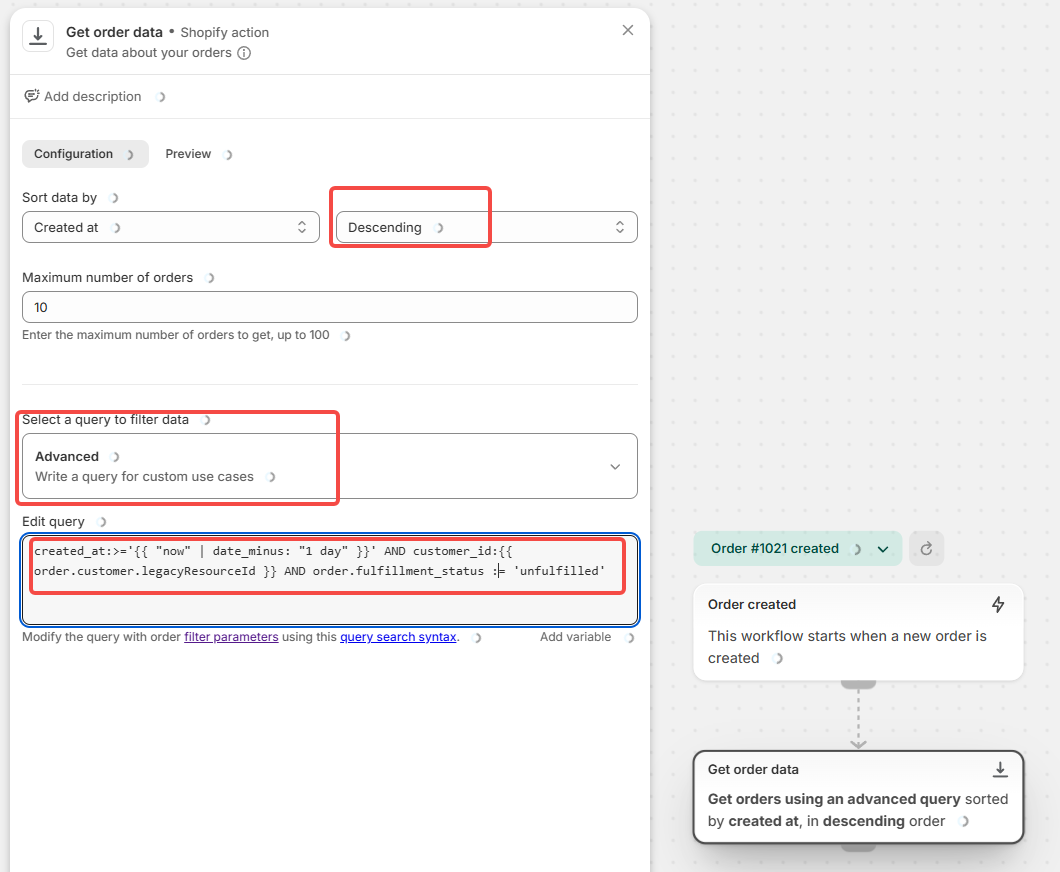
Important note:
Shopify Flow query capabilities can vary. The purpose of this query is to limit results to recent, relevant orders. Always validate this logic in your Flow environment.
This step returns a list of orders, not a single order.
3. Count Matching Orders
Add an action:
Flow → Count → Get order data
Then add a condition:
Continue only if count is greater than 1
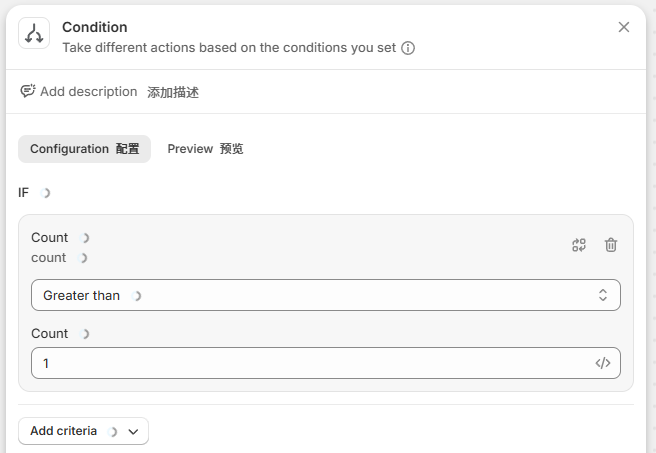
This ensures the workflow only runs when duplicate orders are detected.
4. Compare Shipping Details
Since the query does not filter by address, you need to add conditions.
Typical checks include:
ZIP code matches
Shipping address matches
For example:
Compare current order ZIP with each retrieved order
Optionally compare address line for higher accuracy
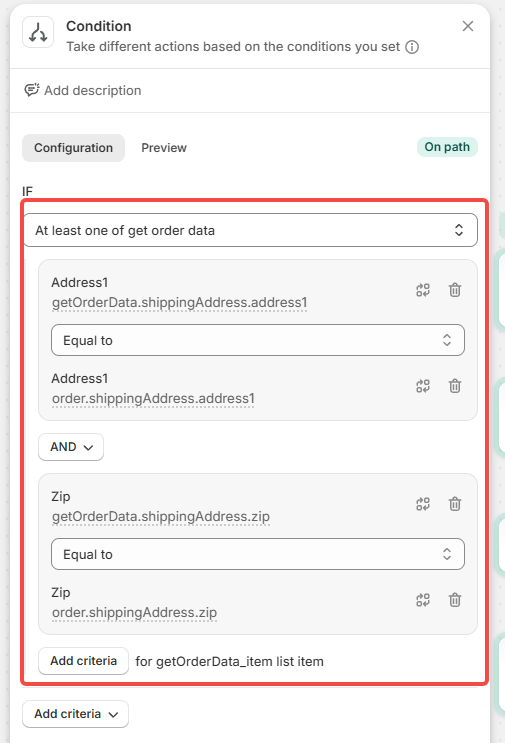
Why this matters:
Using only ZIP code can create false matches in shared buildings or offices.
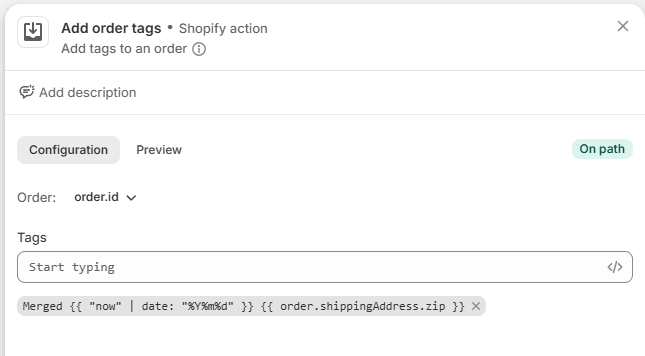
5. Apply a Structured Tag
If conditions are met, apply a tag:
Tag naming convention:
Merged Ymd zip :
Merged {{order.customer.displayName}} {{ "now" | date: "%Y%m%d" }} {{ order.shippingAddress.zip }}This creates a clear grouping signal for your team.
6. Loop Through Matching Orders
Add an action:
Shopify Flow → For each loop
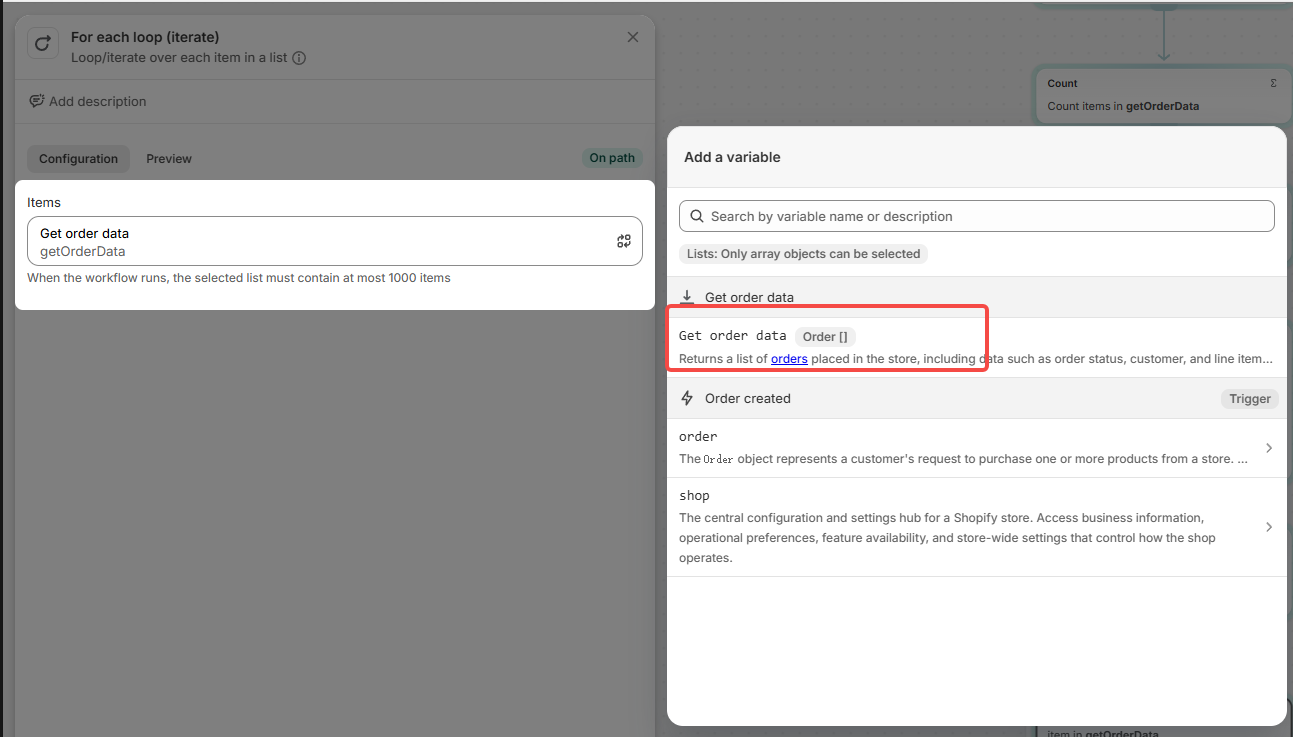
This loops through all retrieved orders.
Inside the loop:
Recheck conditions if needed
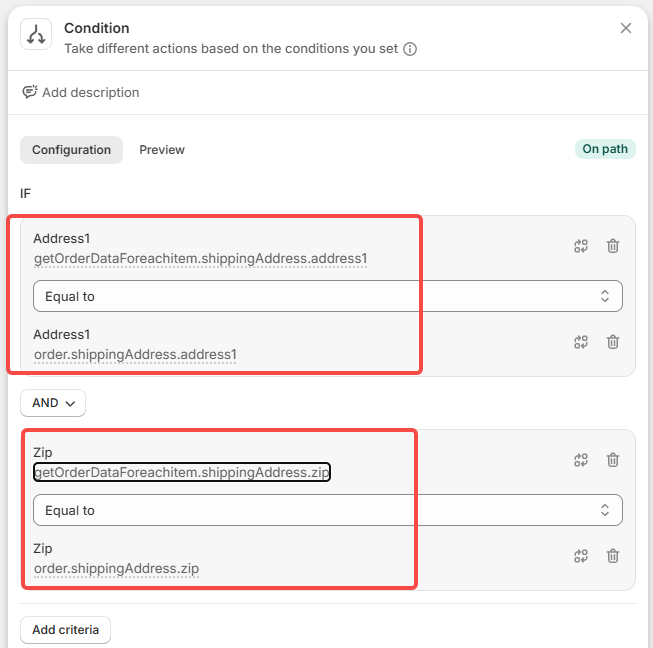
Apply the same tag to each order
Tag naming convention: Merged Ymd zip :
Merged {{order.customer.displayName}} {{ "now" | date: "%Y%m%d" }} {{ order.shippingAddress.zip }}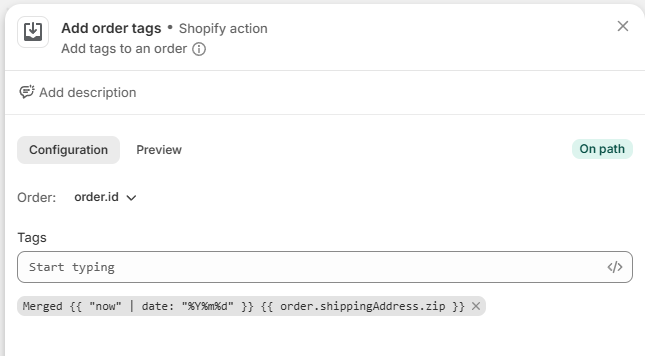
Note:
The current order may also be included. Applying the same tag is safe, as Shopify does not duplicate identical tags.
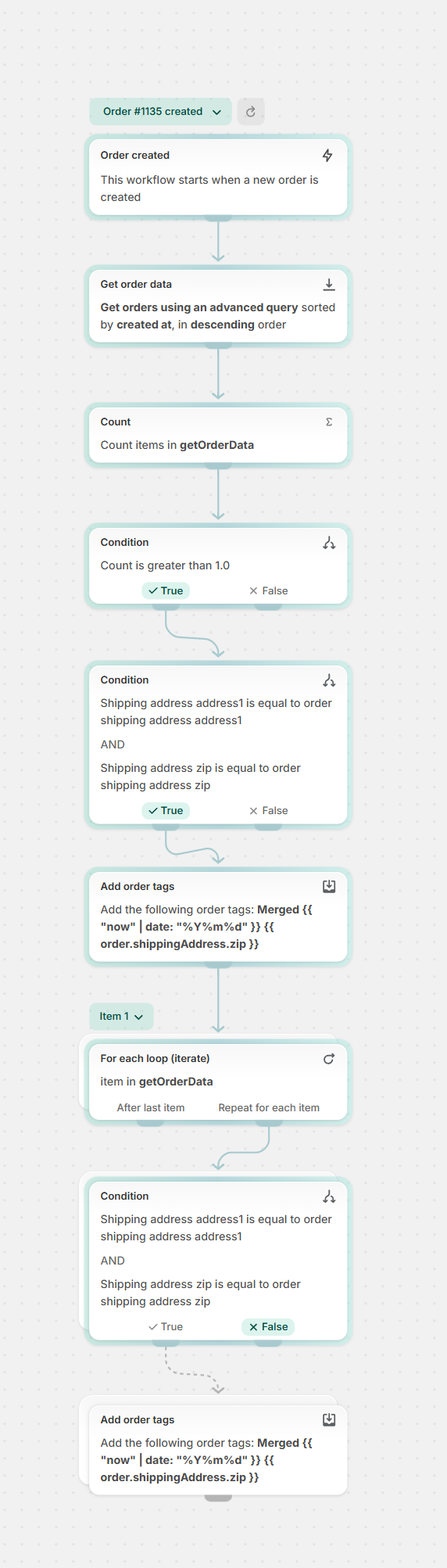
7. Final Workflow Structure
The complete workflow includes:
Trigger
Order retrieval
Count validation
Address comparison
Tagging
Loop processing
Importable Workflow Code
The following is the configured workflow code, which can be imported directly into Shopify Flow.
Note: Depending on your store setup, you may need to make small adjustments after import.
013eab13b02ccc888955afa211c827b6e1f91915ad13ea71c712c5f7d91c4b27:{"__metadata":{"version":0.1},"root":{"steps":[{"step_id":"01KNKM37DZ9SCQD3ZH1ZRJ89EQ","step_position":[0,0],"config_field_values":[],"task_id":"shopify::admin::order_created","task_version":"0.1","task_type":"TRIGGER","description":null,"note":null,"name":null},{"step_id":"01KNKM3ST5C8SF5DA2Y4GAWFWY","step_position":[0,200],"config_field_values":[{"config_field_id":"sort_by","value":"{\"sortKey\":\"CREATED_AT\",\"order\":\"DESCENDING\"}"},{"config_field_id":"max_root_records","value":"10"},{"config_field_id":"query","value":"created_at:>='{{ \"now\" | date_minus: \"1 day\" }}' AND customer_id:{{ order.customer.legacyResourceId }} AND fulfillment_status:unfulfilled"}],"task_id":"shopify::flow::fetch::orders","task_version":"v1","task_type":"ACTION","description":null,"note":null,"name":"Get order data"},{"step_id":"01KNKM7WVWGQ3P4WB1FTN5CK1V","step_position":[0,360],"config_field_values":[{"config_field_id":"listpath","value":"getOrderData"}],"task_id":"shopify::flow::count","task_version":"0.1","task_type":"ACTION","description":null,"note":null,"name":"Count"},{"step_id":"01KNKM8T6CSVES4G6T63ZCAQBP","step_position":[0,500],"config_field_values":[{"config_field_id":"condition","value":"{\"uuid\":\"01KNKM92A2YCJYYVF97B3GT589\",\"lhs\":{\"uuid\":\"01KNKM90JZJTPNKMTSY1Y3XCN8\",\"parent_uuid\":\"01KNKM92A2YCJYYVF97B3GT589\",\"lhs\":{\"uuid\":\"01KNKM92A2XPSB9KXMMMK8N6YZ\",\"parent_uuid\":\"01KNKM90JZJTPNKMTSY1Y3XCN8\",\"value\":\"count\",\"comparison_value_type\":\"EnvironmentValue\",\"full_environment_path\":\"count\"},\"rhs\":{\"uuid\":\"01KNKM9DQ215V5205JTEAPEWXP\",\"parent_uuid\":\"01KNKM90JZJTPNKMTSY1Y3XCN8\",\"value\":\"1\",\"comparison_value_type\":\"LiteralValue\"},\"value_type\":\"EnvironmentScalarDefinition:Int\",\"operator\":\">\",\"operation_type\":\"Comparison\"},\"operator\":\"AND\",\"operation_type\":\"LogicalExpression\"}"}],"task_id":"shopify::flow::condition","task_version":"0.1","task_type":"CONDITION","description":null,"note":null,"name":null},{"step_id":"01KNKMB5YWR5GKYG45PK70CW0Q","step_position":[-160,660],"config_field_values":[{"config_field_id":"condition","value":"{\"uuid\":\"01KNKMMD8HXYP9SPXAGFZAXK4Y\",\"lhs\":{\"uuid\":\"01KNKMMD8HRDKXVJJZEEVBJRJ3\",\"parent_uuid\":\"01KNKMMD8HXYP9SPXAGFZAXK4Y\",\"array_path\":{\"uuid\":\"01KNKMMD8HRZX5NS0FRWSJSCP6\",\"parent_uuid\":\"01KNKMMD8HRDKXVJJZEEVBJRJ3\",\"value\":\"getOrderData\",\"comparison_value_type\":\"EnvironmentValue\"},\"array_item_key\":{\"uuid\":\"01KNKMMD8H1AQGCV81CE1S2SME\",\"parent_uuid\":\"01KNKMMD8HRDKXVJJZEEVBJRJ3\",\"value\":\"getOrderData_item\",\"comparison_value_type\":\"EnvironmentValue\"},\"operation\":{\"uuid\":\"01KNKMSD09C4E9NHHQ7V65FRRG\",\"parent_uuid\":\"01KNKMMD8HRDKXVJJZEEVBJRJ3\",\"lhs\":{\"uuid\":\"01KNKMMD8H6KF0FXMCV8WME8DF\",\"parent_uuid\":\"01KNKMSD09C4E9NHHQ7V65FRRG\",\"lhs\":{\"uuid\":\"01KNKMMD8H9QFETR2AAGC3GF89\",\"parent_uuid\":\"01KNKMMD8H6KF0FXMCV8WME8DF\",\"value\":\"getOrderData_item.shippingAddress.address1\",\"comparison_value_type\":\"EnvironmentValue\",\"full_environment_path\":\"getOrderData_item.shippingAddress.address1\"},\"rhs\":{\"uuid\":\"01KNKMNHN3GG8GM5RZ9VEM4M0W\",\"parent_uuid\":\"01KNKMMD8H6KF0FXMCV8WME8DF\",\"value\":\"order.shippingAddress.address1\",\"comparison_value_type\":\"EnvironmentValue\"},\"value_type\":\"EnvironmentScalarDefinition:String\",\"operator\":\"==\",\"operation_type\":\"Comparison\"},\"rhs\":{\"uuid\":\"01KNKMSD09JYRNCKG2J3VA3KCT\",\"parent_uuid\":\"01KNKMSD09C4E9NHHQ7V65FRRG\",\"lhs\":{\"uuid\":\"01KNKMSD0974SWHT79CTAH8QXB\",\"parent_uuid\":\"01KNKMSD09JYRNCKG2J3VA3KCT\",\"value\":\"getOrderData_item.shippingAddress.zip\",\"comparison_value_type\":\"EnvironmentValue\",\"full_environment_path\":\"getOrderData_item.shippingAddress.zip\"},\"rhs\":{\"uuid\":\"01KNKMTBCQGQQDGYZNCRYBKTTX\",\"parent_uuid\":\"01KNKMSD09JYRNCKG2J3VA3KCT\",\"value\":\"order.shippingAddress.zip\",\"comparison_value_type\":\"EnvironmentValue\"},\"value_type\":\"EnvironmentScalarDefinition:String\",\"operator\":\"==\",\"operation_type\":\"Comparison\"},\"operator\":\"AND\",\"operation_type\":\"LogicalExpression\"},\"operator\":\"ANY\",\"operation_type\":\"ArrayExpression\"},\"operator\":\"AND\",\"operation_type\":\"LogicalExpression\"}"}],"task_id":"shopify::flow::condition","task_version":"0.1","task_type":"CONDITION","description":null,"note":null,"name":null},{"step_id":"01KNKMVJ0896S39NTTGK4AX6XK","step_position":[-320,920],"config_field_values":[{"config_field_id":"order_id","value":"{\"value\":\"\",\"default_value\":\"order.id\"}"},{"config_field_id":"tags","value":"[\"Merged {{order.customer.displayName}} {{ \\\"now\\\" | date: \\\"%Y%m%d\\\" }} {{ order.shippingAddress.zip }}\"]"}],"task_id":"shopify::admin::add_order_tags","task_version":"0.1","task_type":"ACTION","description":null,"note":null,"name":null},{"step_id":"01KNKMY2RM773ZMEEEGH48HFRV","step_position":[-320,1100],"config_field_values":[{"config_field_id":"listpath","value":"getOrderData"}],"task_id":"shopify::flow::foreach","task_version":"0.1","task_type":"FOREACH","description":null,"note":null,"name":null},{"step_id":"01KNKMZ4KHQBN03GY3A8KVNXWQ","step_position":[-140,1260],"config_field_values":[{"config_field_id":"condition","value":"{\"uuid\":\"01KNKN3FZQPJJZV5STAR48R3GS\",\"lhs\":{\"uuid\":\"01KNKMZN2TQSP2Z8VV3288K8KD\",\"parent_uuid\":\"01KNKN3FZQPJJZV5STAR48R3GS\",\"lhs\":{\"uuid\":\"01KNKN06VZCW68V9V084MC5776\",\"parent_uuid\":\"01KNKMZN2TQSP2Z8VV3288K8KD\",\"value\":\"getOrderDataForeachitem.shippingAddress.address1\",\"comparison_value_type\":\"EnvironmentValue\",\"full_environment_path\":\"getOrderDataForeachitem.shippingAddress.address1\"},\"rhs\":{\"uuid\":\"01KNKN13XKA0BPHC9GQW8BYTS8\",\"parent_uuid\":\"01KNKMZN2TQSP2Z8VV3288K8KD\",\"value\":\"order.shippingAddress.address1\",\"comparison_value_type\":\"EnvironmentValue\"},\"value_type\":\"EnvironmentScalarDefinition:String\",\"operator\":\"==\",\"operation_type\":\"Comparison\"},\"rhs\":{\"uuid\":\"01KNKN1AF7Q9RBBJWFYAJZWEV6\",\"parent_uuid\":\"01KNKN3FZQPJJZV5STAR48R3GS\",\"lhs\":{\"uuid\":\"01KNKN3FZQP0EDEW648Y4H0VP6\",\"parent_uuid\":\"01KNKN1AF7Q9RBBJWFYAJZWEV6\",\"value\":\"getOrderDataForeachitem.shippingAddress.zip\",\"comparison_value_type\":\"EnvironmentValue\",\"full_environment_path\":\"getOrderDataForeachitem.shippingAddress.zip\"},\"rhs\":{\"uuid\":\"01KNKN52QR79THY44XJCDMJ30N\",\"parent_uuid\":\"01KNKN1AF7Q9RBBJWFYAJZWEV6\",\"value\":\"order.shippingAddress.zip\",\"comparison_value_type\":\"EnvironmentValue\"},\"value_type\":\"EnvironmentScalarDefinition:String\",\"operator\":\"==\",\"operation_type\":\"Comparison\"},\"operator\":\"AND\",\"operation_type\":\"LogicalExpression\"}"}],"task_id":"shopify::flow::condition","task_version":"0.1","task_type":"CONDITION","description":null,"note":null,"name":null},{"step_id":"01KNKN5XH3W7C1BBCYSZ07DHZE","step_position":[-300,1520],"config_field_values":[{"config_field_id":"order_id","value":"{\"value\":\"\",\"default_value\":\"getOrderDataForeachitem.id\"}"},{"config_field_id":"tags","value":"[\"Merged {{order.customer.displayName}} {{ \\\"now\\\" | date: \\\"%Y%m%d\\\" }} {{ order.shippingAddress.zip }}\"]"}],"task_id":"shopify::admin::add_order_tags","task_version":"0.1","task_type":"ACTION","description":null,"note":null,"name":null}],"links":[{"from_step_id":"01KNKM37DZ9SCQD3ZH1ZRJ89EQ","from_port_id":"output","to_step_id":"01KNKM3ST5C8SF5DA2Y4GAWFWY","to_port_id":"input"},{"from_step_id":"01KNKM3ST5C8SF5DA2Y4GAWFWY","from_port_id":"output","to_step_id":"01KNKM7WVWGQ3P4WB1FTN5CK1V","to_port_id":"input"},{"from_step_id":"01KNKM7WVWGQ3P4WB1FTN5CK1V","from_port_id":"output","to_step_id":"01KNKM8T6CSVES4G6T63ZCAQBP","to_port_id":"input"},{"from_step_id":"01KNKM8T6CSVES4G6T63ZCAQBP","from_port_id":"true","to_step_id":"01KNKMB5YWR5GKYG45PK70CW0Q","to_port_id":"input"},{"from_step_id":"01KNKMB5YWR5GKYG45PK70CW0Q","from_port_id":"true","to_step_id":"01KNKMVJ0896S39NTTGK4AX6XK","to_port_id":"input"},{"from_step_id":"01KNKMVJ0896S39NTTGK4AX6XK","from_port_id":"output","to_step_id":"01KNKMY2RM773ZMEEEGH48HFRV","to_port_id":"input"},{"from_step_id":"01KNKMY2RM773ZMEEEGH48HFRV","from_port_id":"loop_body","to_step_id":"01KNKMZ4KHQBN03GY3A8KVNXWQ","to_port_id":"input"},{"from_step_id":"01KNKMZ4KHQBN03GY3A8KVNXWQ","from_port_id":"true","to_step_id":"01KNKN5XH3W7C1BBCYSZ07DHZE","to_port_id":"input"}],"patched_fields":[],"variables":[],"note":null,"vertical_layout_enabled":true,"workflow_name":"New Workflow"}}Result / Benefit
After implementing this workflow, businesses typically see improvements in several areas.
Reduced operational workload
Teams no longer need to manually identify duplicate orders.
Lower shipping costs
Orders going to the same address can be consolidated into one shipment.
Improved fulfillment accuracy
Clear tagging reduces the chance of missed consolidation opportunities.
Scalable operations
The process continues to work as order volume grows.
From a platform evaluation perspective, this demonstrates how Shopify supports real world automation without requiring heavy development or additional systems.
Edge Cases to Consider
Automation works best when combined with operational awareness.
Common edge cases include:
Gift orders where items should not be merged
Address variations such as "Street" vs "St."
Orders with different payment or financial status
To improve accuracy, consider:
Using address validation tools at checkout
Limiting the workflow to paid orders only
FAQ
Can Shopify automatically merge orders?
No. Shopify can tag and organize orders, but merging requires manual action or a third party app.
Does this work with 3PL or warehouse systems?
Yes. Most fulfillment systems can filter or hold orders based on Shopify tags, allowing teams to review them before shipping.
Will this impact checkout or customer experience?
No. This workflow runs after the order is created and does not affect the customer journey.
For any questions or further assistance, please don't hesitate to reach out. Simply leave us a message, and we will respond to you as soon as possible. We're here to help and look forward to working with you!