
Blog
 Anne
AnneIn today’s ecommerce environment, Shopify store speed is no longer just a technical concern. It directly affects search engine visibility, user experience, and most importantly, conversion rates.
According to a landmark study by Deloitte, a mere 0.1-second improvement in mobile site speed can boost conversion rates by 8.4% for retail sites. Conversely, Google research indicates that as page load time goes from 1s to 3s, the probability of a user bouncing increases by 32%. For Shopify merchants, slow performance isn't just a nuisance—it’s a consistent drain on your bottom line.
This guide walks through practical and proven Shopify speed optimization techniques designed to meet 2026’s performance standards and convert more visitors into loyal customers.
Why Shopify Store Speed Has a Direct Impact on Revenue
Faster Stores Convert Better
When pages load quickly, customers move from product discovery to checkout without friction. Portent data reveals that websites loading in 0-2 seconds have the highest conversion rates; every additional second of load time results in a 4.42% drop in conversions on average.
Page Speed Improves Shopify SEO Performance
Google uses Core Web Vitals (CWV) as a primary ranking signal. Currently, HTTP Archive reports that only about 50% of websites pass all CWV thresholds. By optimizing your Largest Contentful Paint (LCP) to under 2.5 seconds, you gain a significant ranking advantage over slower competitors.
Better User Experience Builds Trust
A fast site signals reliability. Data from Think with Google shows that 53% of mobile visits are abandoned if pages take longer than 3 seconds to load. Speed is the first impression your brand makes.
Common Reasons Why Shopify Stores Become Slow Over Time
Many Shopify stores start fast but slow down as features and apps are added. The most frequent causes include:
Large Uncompressed Images: Using legacy formats like PNG for hero banners without leveraging WebP or AVIF.
App Bloat: Too many installed Shopify apps, each injecting heavy JavaScript and CSS into your
theme.liquid.Inefficient Theme Code: Unused scripts and bloated liquid files that increase "Liquid Render Time."
Render-Blocking Resources: Critical content waiting for non-essential scripts to load before displaying.
Suboptimal Asset Delivery: Failing to serve all assets (like custom fonts and hard-coded images) through Shopify’s Content Delivery Network (CDN), or lacking proper browser caching headers.
Identifying these bottlenecks is the first step toward effective Shopify performance optimization.
Proven Shopify Speed Optimization Techniques That Actually Work
Optimize Product and Collection Images
Images are often the largest contributors to slow load times on Shopify stores.
Use Next-Gen Formats: Convert images to WebP or AVIF to reduce file size by up to 30% compared to JPEG without losing quality.
Dynamic Sizing: Use Liquid parameters to ensure mobile users aren't downloading 2000px desktop images.
Instead of loading full resolution images everywhere, use size parameters directly in Liquid:
<img src="{{ product.featured_image | img_url: '600x600' }}" alt="Product image">This ensures each page only loads images at the size actually required.
Audit and Reduce Shopify Apps Regularly
Every Shopify app adds scripts that load on the storefront. Over time, unused or overlapping apps quietly slow down performance.
Review installed apps regularly and remove those that are no longer essential. If an app is only used for a small feature, consider replacing it with lightweight custom code.
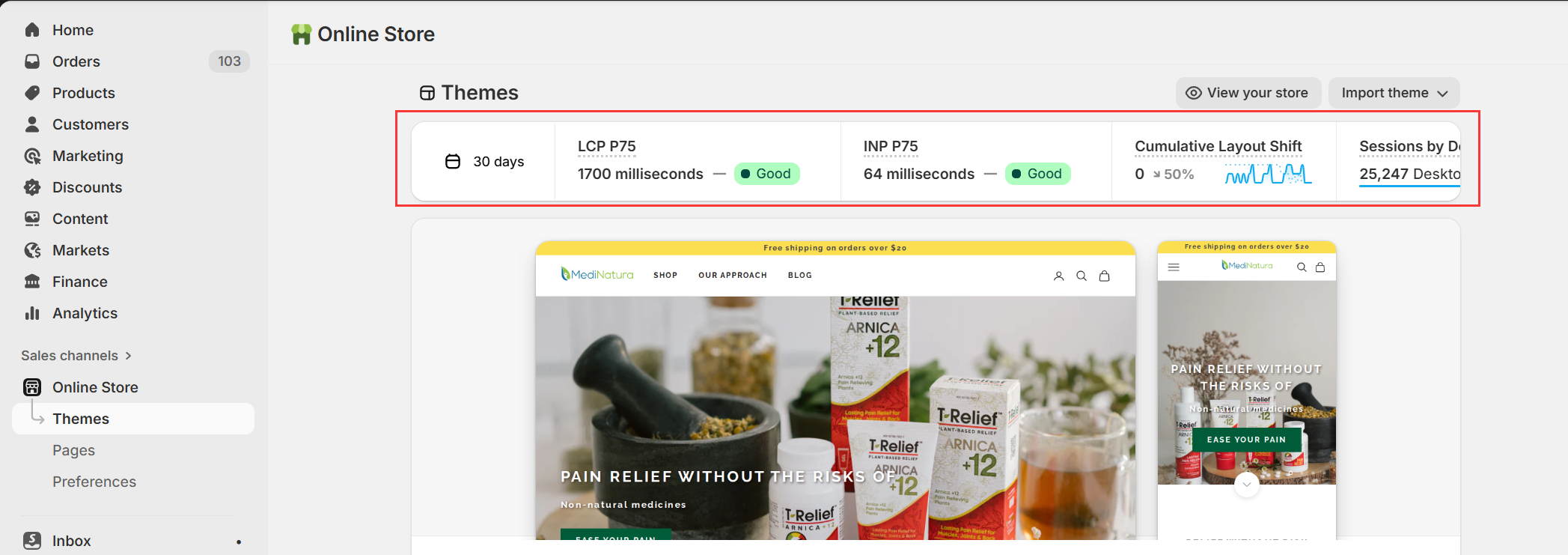
Shopify provides a built in Online Store Speed Report in the admin under Online Store and Themes. Use this report to see how app installs or theme changes impact your performance score.
Clean and Optimize Theme Code
Unoptimized theme code is a common but often overlooked issue.
Remove unused CSS and JavaScript files whenever possible. Minify assets to reduce file size. Load non critical scripts asynchronously so they do not block page rendering:
<script src="example.js" async></script>
This allows the browser to display content faster while scripts load in the background.
Enable Lazy Loading for Images and Media
Lazy loading ensures that images and videos only load when they enter the user’s viewport.
This significantly improves initial page load time, especially on product and collection pages with many images.
<img src="image.jpg" loading="lazy" alt="Product image">
Above the fold content loads immediately, while the rest loads progressively as users scroll.
Note: Never lazy load "above-the-fold" content (like your hero banner), as this will negatively impact your LCP score.
Fully Leverage Shopify CDN and Browser Caching
Shopify automatically serves assets through a global CDN. To benefit fully, ensure all images, videos, and static assets are loaded from cdn.shopify.com.
Browser caching also plays a critical role. Cached assets reduce repeat requests for returning visitors, resulting in faster load times and smoother navigation.
Use Speed Optimization Apps Carefully
Some apps can help automate performance improvements, but they should be used selectively.
Examples include TinyIMG for image compression and lazy loading, or Hyperspeed for code minification and script optimization.
Always test performance impact before and after installation. Avoid stacking multiple optimization apps that overlap in functionality.
How to Measure and Monitor Shopify Store Speed
Shopify Speed Score
Available directly in Shopify Admin under Online Store → Speed. This provides a high level overview and actionable recommendations.
Google PageSpeed Insights
The gold standard. It provides "Field Data" based on the Chrome User Experience Report (CrUX), showing how real users experience your store over the last 28 days.
GTmetrix and Pingdom
These tools offer waterfall charts and advanced diagnostics to pinpoint specific bottlenecks.
Regular testing ensures that new content, apps, or theme updates do not degrade performance over time.
Turning Shopify Speed Optimization Into a Competitive Advantage
Shopify store speed influences SEO rankings, user satisfaction, and conversion rates at every stage of the customer journey.
By systematically optimizing images, reducing app bloat, cleaning theme code, implementing lazy loading, and leveraging Shopify’s CDN, merchants can create a faster and more reliable shopping experience.
A fast Shopify store does more than load quickly. It builds trust, improves search visibility, and quietly increases sales without increasing marketing spend.
If you are looking to improve Shopify performance at a deeper level, including technical audits and custom optimization, our team can help you build a speed optimized Shopify store designed for long term growth.
For any questions or further assistance, please don't hesitate to reach out. Simply leave us a message, and we will respond to you as soon as possible. We're here to help and look forward to working with you!